Who it is for
For people ready to wire their agent into their stack with tools and MCP so it can act in the real world, not just advise from the sidelines.
Connect your agent to your stack with tools and MCP so it acts in the real world instead of suggesting from the sidelines.
A spreadsheet sits open with twelve customer accounts flagged for renewal, and you ask your AI assistant to draft outreach for each one. The gap between a system that produces good text and one that produces finished outcomes is exactly what you'll close.
Score your own setup on the spectrum from "advice from the sidelines" to "work that ships," and you'll likely land somewhere uncomfortable: the agent drafts good emails but can't send them, summarizes a ticket queue it can't update, proposes a calendar block it can't create.
For people ready to wire their agent into their stack with tools and MCP so it can act in the real world, not just advise from the sidelines.
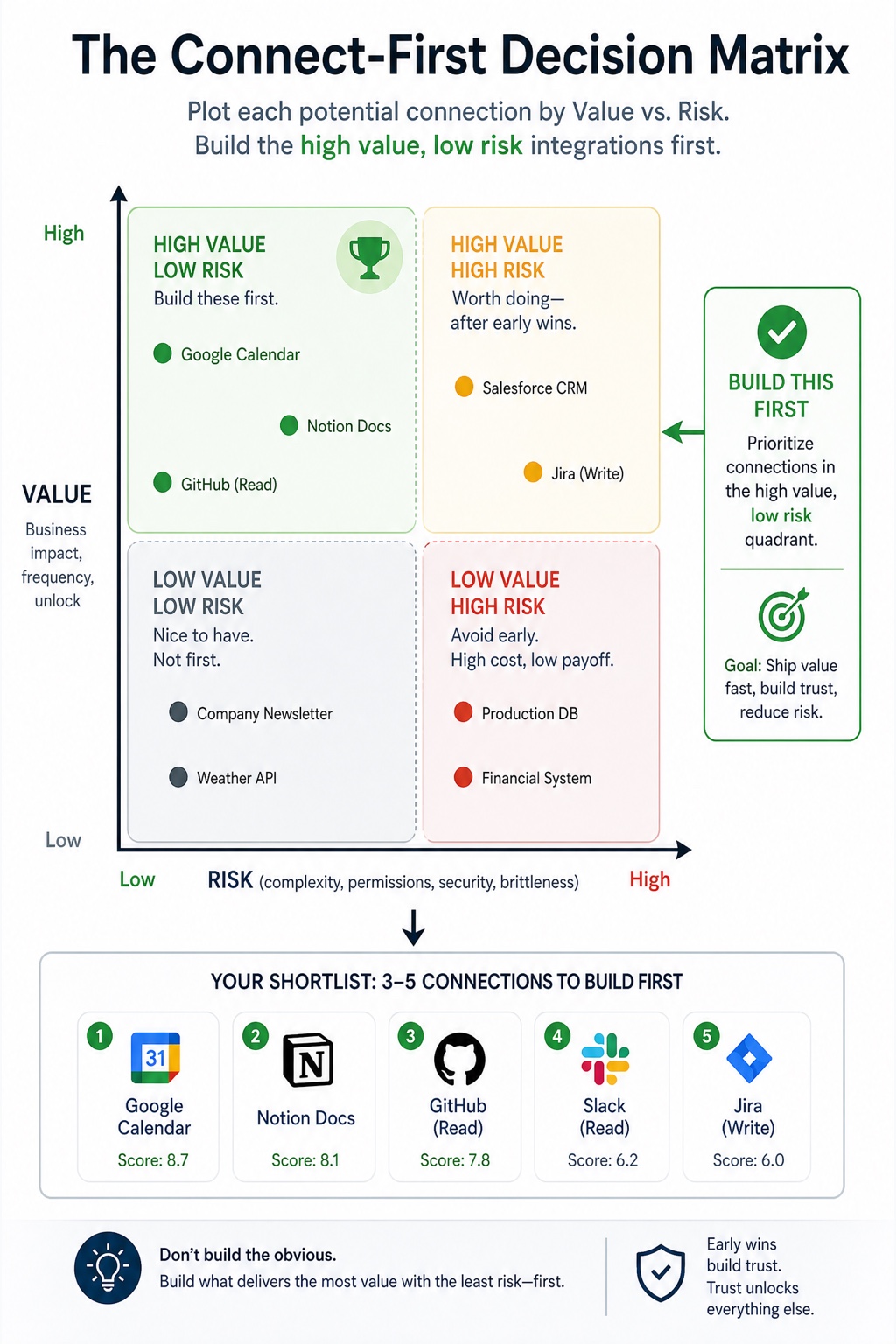
You'll see why a pile of "wouldn't it be nice if the agent could..." is not a plan, and why building all of it at once ships none of it well. Most teams pick their first integration when someone says "let's connect Slack" or "let's wire it to the CRM," everyone nods, and a week disappears.
Between a working tool definition and an agent that actually calls it sits plumbing most teams underestimate: an MCP server that exposes the tool, a client inside your agent that discovers it, and a handshake that must succeed before a single real action runs.
You'll understand why the stakes rise as the agent does more than read. When your agent only reads a CRM, a bad call costs you a wrong answer you can ignore.
Three weeks after you wire your agent into your ticketing system, response times look great in the demo and nobody mentions it again. Then a teammate asks why the agent stopped tagging urgent tickets.
Pick the single task that cost you the most copy-paste handoffs this week—the one where the assistant did the thinking and you did the moving. Fill in: Today my agent SUGGESTS ____, but I still have to manually ____. If it could ACT, the task would end when ____.
Picture one instruction—"reconcile this week's refunds against the support log and flag mismatches"—handed to two setups. The sidelined assistant explains how: export the payment report, pull the support tickets, match on order ID, eyeball discrepancies. Accurate, and entirely your labor.
List up to five connections you want your agent to have, and fill in this grid for each. Connection: ____ What it reads/writes: ____ Number of agents that would use it: ____ Likely reused beyond this one task? Keep it—the raw list becomes a ranked shortlist.
Run any planned connection against these before you build.
EPUB, PDF, and HTML are included so the book can work on an e-reader, as a designed copy, or as a searchable desk reference.
For e-readers and reading apps.
The designed edition with diagrams and layouts intact.
Searchable, copy-pasteable, and practical as a reference.
Yes. You get the complete edition, including the chapter sequence and internal materials described on this page.
EPUB, PDF, and HTML are included so you can read on an e-reader, keep a designed copy, or use the searchable browser version.
Because this is an instant digital download, broad change-of-mind refunds are not offered after the files have been accessed. Refund requests are reviewed within 7 days for duplicate purchases, accidental purchases before access, access failures we cannot fix, wrong files, corrupted files, or pages that materially misdescribe the book.